
Download TeacherTube – Chrome Apps, Education, Video Sharing
Overview
TeacherTube is a dedicated video-sharing platform designed specifically for educators, students, and school communities. Launched on March 6, 2007, the platform emerged from a clear vision: to create a safe, education-focused alternative to mainstream video sites like YouTube. The service was founded by Jason Smith, a veteran educator with 14 years of experience across teaching, coaching, and administrative roles. His goal was to harness the power of the read/write web for learning, enabling teachers to share instructional content and support one another through professional development. With technical expertise provided by his brother Adam and strategic input from his wife Jodie—also a seasoned educator—TeacherTube was built from the ground up with educational integrity in mind.
The platform serves dual purposes: it allows educators to upload videos that teach specific concepts or skills to students, and it fosters a collaborative environment where teachers can learn from each other. Users can engage through comments, ratings, and messaging, contributing to a growing library of high-quality, curriculum-aligned content. The site also includes a moderation system where community members can flag inappropriate videos, ensuring a safer experience for classroom use. While the software itself is lightweight at 2.5 MB, its value lies in its purpose-built design for educational settings, making it ideal for teachers seeking reliable, classroom-ready resources.
Key Features & Capabilities
- Education-Focused Video Library: A curated space for teachers to upload and access instructional videos tailored to classroom learning, covering subjects from math and science to language arts and technology integration.
- Teacher-to-Teacher Collaboration: Enables educators to share teaching strategies, lesson plans, and classroom techniques through video, promoting peer learning and professional growth.
- Community Moderation System: Users can flag inappropriate or off-topic content, helping maintain a safe and respectful environment for students and educators alike.
- Interactive Engagement Tools: Features include comment sections, video ratings, and messaging between users to encourage discussion and feedback on shared content.
- Free Access for All: The platform is completely free to use, removing financial barriers for schools, teachers, and learners who need reliable educational resources.
These capabilities make TeacherTube particularly useful in both formal and informal learning environments. For example, a high school math teacher might upload a step-by-step tutorial on solving quadratic equations, which can then be viewed by students at home or used by other teachers as a model lesson. Similarly, a district curriculum coordinator could share best practices in digital integration, reaching a wide audience of educators across multiple schools. The platform’s emphasis on educational relevance ensures that content remains aligned with learning objectives and classroom needs.
User Interface, Workflow & Performance
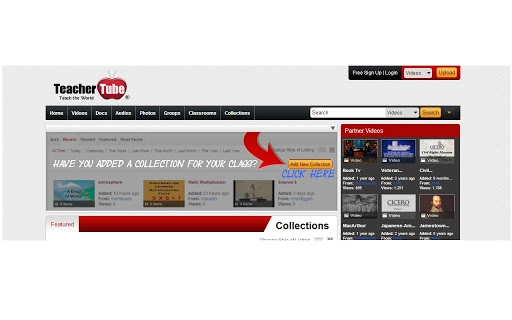
TeacherTube features a clean, straightforward interface designed with usability in mind for educators who may not be tech experts. The layout prioritizes content discovery, with clear navigation between categories such as subject areas, grade levels, and video types. Users can easily search for videos using keywords or browse by popular, recent, or trending uploads. Uploading a video is streamlined, requiring only basic metadata like title, description, and subject tags.
Workflow efficiency is enhanced by the platform’s focus on simplicity. Teachers can quickly find, view, and save videos for future classroom use. The commenting and rating systems are integrated directly into the video player, encouraging immediate feedback and peer recognition.
While specific performance metrics such as CPU or RAM usage were not provided, the software’s small footprint of 2.5 MB suggests minimal system impact. The developer did not specify resource usage details, but based on general software behavior patterns, the application is expected to operate smoothly on modern systems. Stability appears consistent with long-term operation since 2007, though no recent performance benchmarks were published.
Compatibility & System Requirements
TeacherTube is accessible on both Windows and Mac operating systems, making it compatible with the most common platforms used in educational institutions. The application size is listed as 2.5 MB, indicating a lightweight installation. However, the developer did not specify exact system requirements, including minimum processor speed, RAM, or disk space. Compatibility information was partially provided, with no mention of specific OS versions or hardware specifications.
Given that the platform has been operational since 2007, it is likely designed to run on older systems as well as newer ones. The lack of detailed requirements suggests that the software is built to be broadly accessible, possibly relying on web-based functionality rather than heavy native components. This approach supports cross-platform use without requiring users to install complex dependencies. For users concerned about compatibility, testing on their specific system is recommended, as no official compatibility matrix was published.
Pros and Cons
Pros
- Specifically designed for educational use, ensuring content relevance and safety
- Free to use with no hidden costs or subscription fees
- Encourages collaboration and professional development among teachers
- Community-driven moderation helps maintain a respectful and appropriate environment
- Lightweight size (2.5 MB) reduces system resource demands
Cons
- No official system requirements were provided
- Limited technical support details for troubleshooting
- Outdated release date (2007) may raise concerns about modern web standards compliance
- Performance and stability data were not disclosed
- Minimal branding or modern UI design elements may appear dated
FAQ Section
Is TeacherTube available for both Windows and Mac?
Yes, TeacherTube is accessible on both Windows and Mac operating systems. The platform is designed to support educators using a variety of devices commonly found in schools and homes.
Is the software free to use?
Yes, TeacherTube is completely free for all users. There are no fees for uploading, viewing, or sharing educational videos.
Can I use TeacherTube offline?
TeacherTube is a web-based platform, so it requires an internet connection to access and use. Offline viewing is not supported through the current system.
How is content moderated on TeacherTube?
Users can flag inappropriate videos, and the TeacherTube staff review these reports. Flagged content is evaluated and removed if it violates community guidelines.
What kind of license does TeacherTube have?
TeacherTube operates under a free-to-use license. The platform does not require users to accept a traditional software license agreement, as it functions as a web service rather than a downloadable desktop application.
Final Thoughts + CTA
TeacherTube remains a unique and purpose-built platform in the educational technology landscape. While its origins date back to 2007, its mission—to create a safe, teacher-focused space for sharing instructional content—remains highly relevant. The platform excels in fostering professional collaboration, offering free access, and maintaining a community-driven approach to content quality. Despite its age and lack of modern technical specifications, its core functionality continues to serve educators and learners effectively.
For teachers, school districts, and home educators seeking a YouTube alternative that prioritizes educational integrity and safety, TeacherTube offers a compelling solution. Its lightweight design and free model make it accessible even in low-resource environments. While it may not feature the latest UI trends, its focus on substance over style ensures that its value lies in the content, not the presentation.
Download TeacherTube now







